Review Comments (0) Screenshots (4) Questions & Answers (0) Votes (3) Awards (4) Wiki  
(3)
David Macek
5.99.99.99
software.macek.cc
Freeware
544 people
Download JPEG Resampler

1.38 MBDownloaded 1477 times


Review

This is official description

The main purpose of this popular tool is to quickly and easily resize photos from a digital camera to a smaller size for further use (especially to share the photos on web or by email). Nevertheless, Jpeg Resampler 2010 also offers many other features such as
- convert between image formats (JPG, PNG, BMP, JNG, GIF, TGA, JP2, TIF, PSD, XPM)
- 8 different methods of resizing (to megapixels, percents of original, exact size, max size, file size and others)
- 11 filters to apply (for example sharpen, blur, soften, average etc)
-10 different color formats (RGB, ARGB, indexed, grayscale etc)
-5 different types of sorting the images (useful when we change their names)
- 4 threads for processing images (extremely improves performance on some machines)
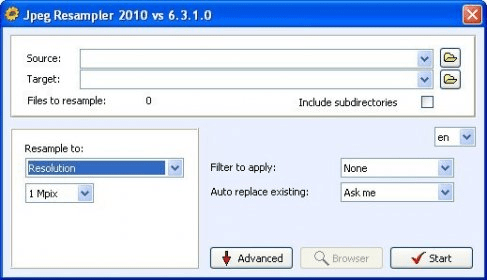
- compact (simple) mode for beginners and advanced mode for advanced users, compact mode offers only the most important features (see the image on the right)
-support for EXIF (autorotation based on EXIF, copy EXIF to target image, extract EXIF to text file)
 
The following review written by one of the Software Informer contributors applies to version 5.0

JPEG Resampler allows you to batch-resample your pictures. A resample is known as the change of one or more of the qualities of an image. There are many uses for an application like this. The first one that comes to mind is to decrease the size of your JPEG file by means of downsampling its quality. For example, when you take a picture and the file size is around 2 megabytes you are talking about a 5 megapixel image; give or take. If you want to decrease the file of that picture so that you can handle it better over the Internet. So, what you do is take some of its quality away. The picture will not look as good (resolution-wise) but it will be smaller. There are many other ways a picture can be resampled. You can change the resolution, the color, apply filters, and more. I like the fact that the application has a marked regard for metadata. Some other applications discard photography information and you end up losing all your precious metadata. Also, the application is a freebie, which doesn't hold true for most applications of this type.
  • Many resample features.
  • None.

Reviewed by: José Fernández

Reviewer rating:

Reviewed: 3 years ago

What's new in version 6.3

-another significant improvement of the speed!
-more metadata supported for Nikon cameras (incl. the lens name)
Report a wrong version Report a wrong program title Suggest a correction

Screenshots

Main window Main window MAIN MAIN GLOBAL SETTINGS GLOBAL SETTINGS RESOLUTIONS RESOLUTIONS

Latest comments


There are no comments, be the first one!
Add new comment

E-mail Address:

Password:

Register now »

Forgot password?

Sign in with:
Download Software Informer Client
Copyright © 2012, Informer Technologies, Inc. About| Privacy and terms| Help| Feedback & Support| Partners program